

Do I need a paid SnapDeploy plan?
No. The free tier (4 containers, 100 running hours a month, 10 deploys a day, no credit card) works with the connector. Always-On, custom domains and databases are paid.

@AAR-Labs
基本情報
Claude Code、Cursor、Codex、Gemini CLI から SnapDeploy アプリ(AWS 上の Docker コンテナ)をデプロイ・管理:ビルド、ログ、環境変数、アドオン、ドメイン。
以下の設定を使って、このサーバーを MCP 対応クライアントに追加してください。
{
  "mcpServers": {
    "snapdeploy": {
      "command": "npx",
      "args": [
        "-y",
        "@snapdeploy/mcp"
      ],
      "env": {
        "SNAPDEPLOY_API_KEY": "sd_pat_your_token"
      }
    }
  }
}List the user's SnapDeploy containers with status and URL, plus plan, deploy-limit and free-hours state. Start here to find container ids/names.
Full status of one container (by name or id): state, URL, port, detected technology, resources. Env-var VALUES are never returned — names only.
Recent RUNTIME logs of a container (CloudWatch, up to 1000 lines). For BUILD logs of a deployment use get_deployments with a deployment_id.
Deployment history of a container, or one deployment in detail (status, error code/message and build-log tail — use this to diagnose a failed build).
Can the user deploy and run apps right now? Merges the deploy limit (5 per rolling 12h — ONLY for accounts without an Always-On/Sprint entitlement; failed attempts count) and the free-hours cap (containers refuse to start at 402 when exhausted), plus any unassigned Always-On subscriptions.
List (or search) the GitHub repositories connected to this SnapDeploy account. If GitHub is not connected yet, returns the connect link for the user.
Scan a repo for the environment variables it needs (import.meta.env / process.env usage). For known keys (Supabase etc.) the reply says where the user finds the value. Do this BEFORE the first deploy of a Lovable/Bolt/v0 export.
Deploy a connected GitHub repo to SnapDeploy: creates the container if needed, links the repo, builds, and waits for the result. Reply includes the live URL or, on failure, the error and build-log tail. On accounts without an Always-On/Sprint entitlement this uses one unit of the deploy limit (failed attempts count); Always-On accounts are uncapped.
Set/replace a container's environment variables (rolling restart, no rebuild). Values are accepted but NEVER echoed back. Public build-time names (VITE_*, NEXT_PUBLIC_*, REACT_APP_*) only take effect in the bundle after the next deploy.
Start a stopped container. May answer 402 when free hours are exhausted — relay that message and link, do not retry.
Stop a running container (safe, reversible — deletion is NOT possible through this connector by design).
Wake a sleeping free-plan container so its URL serves again.
Create a managed add-on: PostgreSQL, MySQL, MariaDB, MongoDB, Redis or RabbitMQ. Requires a purchased add-on subscription — without one this returns the purchase link (relay it, don't retry). Credentials are provisioned server-side and shown to the user in the SnapDeploy UI, never through this connector.
Attach a custom domain to a container. Returns the DNS records the user must create; verification then runs from the SnapDeploy UI.
Attach an UNASSIGNED Always-On subscription to a container (keeps it running 24/7 and lifts the deploy limit). Only call this after the user explicitly confirms — check_quota lists any unassigned subscriptions.
A Model Context Protocol server that lets Claude Code, Claude Desktop, Cursor, Windsurf, Codex CLI, Gemini CLI or any stdio MCP client deploy and manage apps on SnapDeploy, a Docker container hosting platform on AWS. Say "deploy this repo to SnapDeploy" and get a live HTTPS URL back, then check builds, logs, environment variables, managed databases and custom domains without leaving the chat.
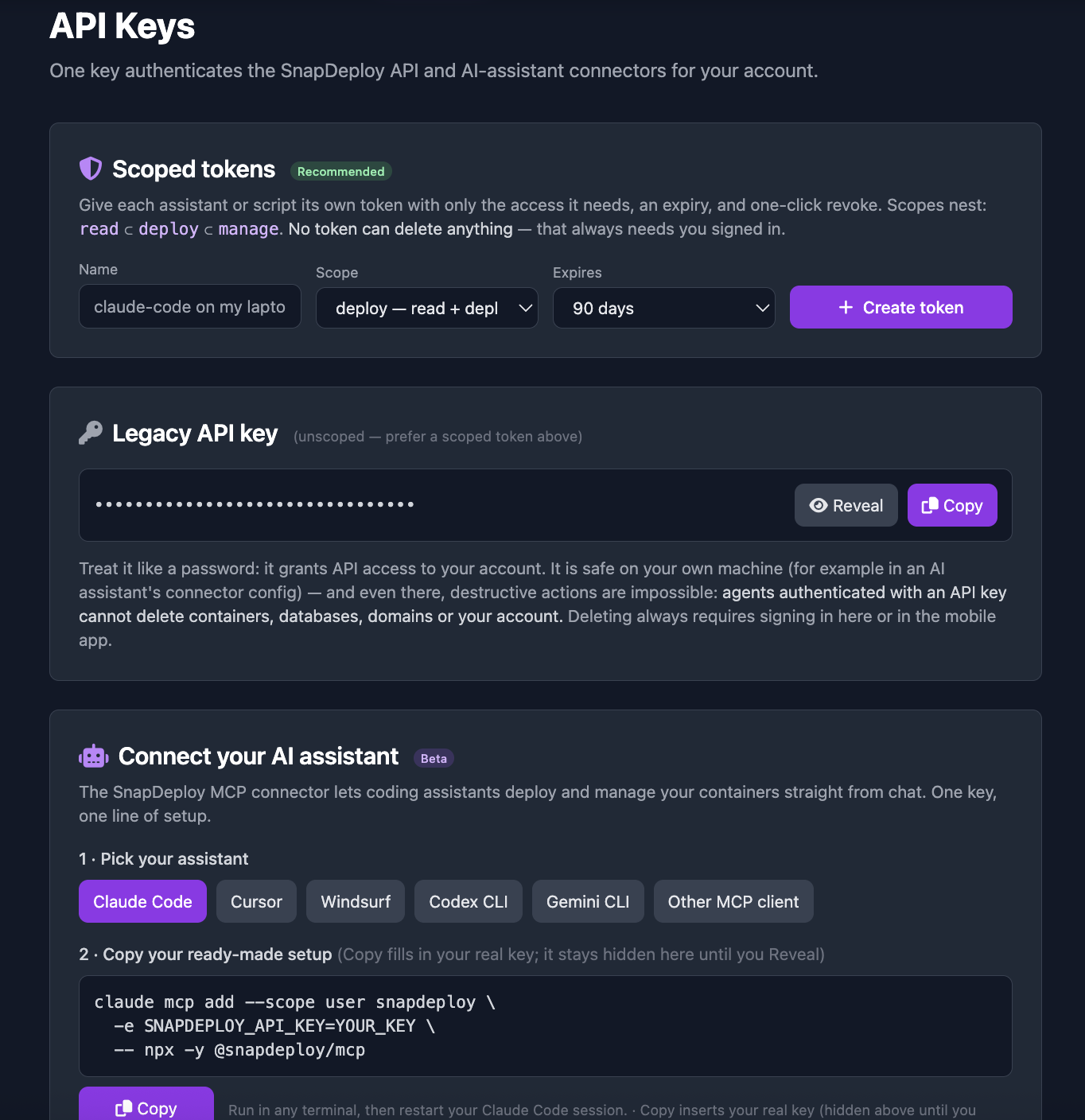
Sign in at https://snapdeploy.dev, open API Keys and create a token with the deploy scope. The page generates the snippets with your token filled in.
Add the server to your client. Claude Code:
claude mcp add --scope user snapdeploy -e SNAPDEPLOY_API_KEY=sd_pat_your_token -- npx -y @snapdeploy/mcp
Any other client: use the JSON configuration on this page.
list_apps, get_status, get_logs, get_deployments, check_quota, list_repos, detect_env_varsdeploy, set_env, start_container, stop_container, wake_containercreate_database, add_domain, assign_always_onScopes nest (read ⊂ deploy ⊂ manage) and the server enforces them before any tool runs.
(set) and credentials are masked on the server, not just in the connector.detect_env_vars.No. The free tier (4 containers, 100 running hours a month, 10 deploys a day, no credit card) works with the connector. Always-On, custom domains and databases are paid.
`deploy` for day-to-day work. `read` for a client that should only inspect. `manage` only if you want the assistant to create databases, add domains or assign Always-On.
No. There is no delete tool and the API refuses destructive calls from tokens. Those actions need a signed-in person.
Docs: https://snapdeploy.dev/docs/mcp. Source: https://github.com/AAR-Labs/snapdeploy-mcp (MIT). npm: `@snapdeploy/mcp`. Official MCP Registry: `io.github.somdip-2310/snapdeploy`.

Official OutageDeck MCP server for vendor-published cloud and SaaS status, incident timelines, and observed uptime history.

Connect Supabase to your AI assistants

YesTechie builds enterprise UniFi networks, cameras, access control, cabling and Wi-Fi for businesses nationwide from its California HQ. Agents can read real project case studies and practical configuration guides, price

Nippy is drag-and-drop hosting (nippy.host) with an MCP server: connect it and your assistant can publish HTML, folders of photos, or file downloads to a live *.nippy.site URL — and keep editing the site in place at the

Development environments for coding agents. Enable multiple agents to work safely and independently with your preferred stack.
コメント