

What does Vmware Vix Mcp Server do?
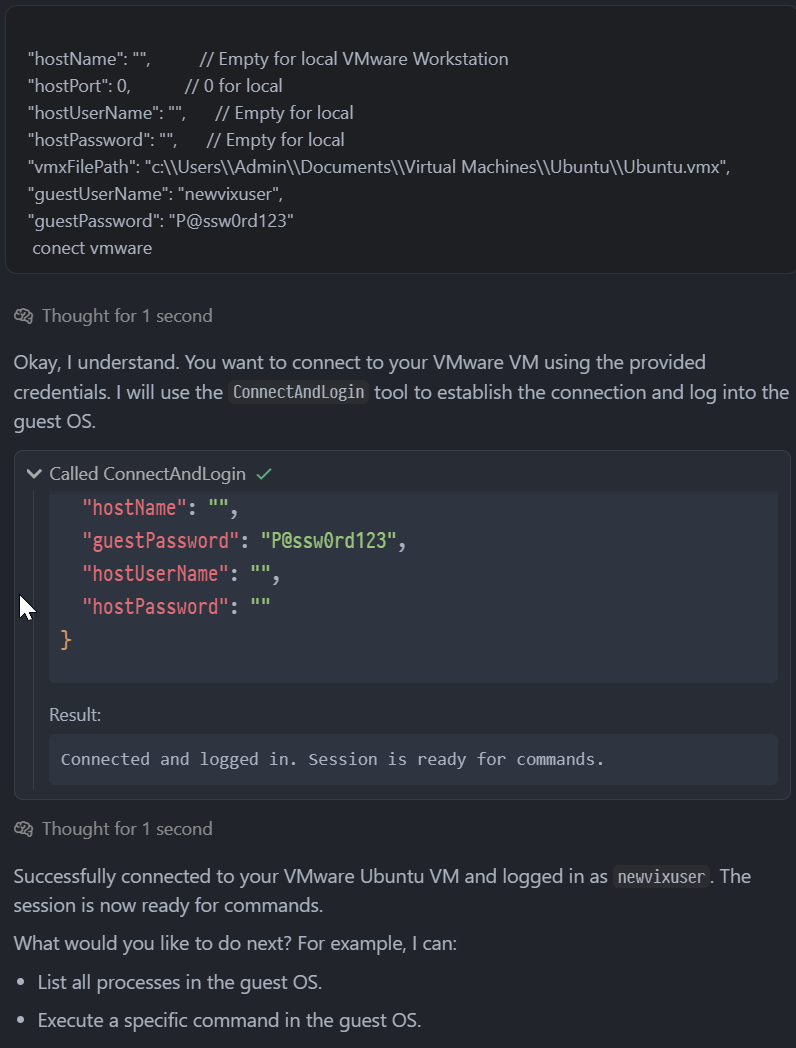
It integrates VMware’s VIX API with the Model Context Protocol, allowing you to manage virtual machines using plain English instructions.
@bivex
.NET bindings for VMware VIX API with Model Context Protocol server for AI-driven virtual machine automation. Enables natural language control of VMware VMs through AI assistants like Cursor IDE.
使用下面的配置,将此服务器添加到你的 MCP 客户端。
{
  "mcpServers": {
    "vmware-vix": {
      "command": "cmd",
      "args": [
        "/c",
        "C:\\path\\to\\McpProcessToolSample.exe"
      ]
    }
  }
}工具列表暂未提供
当前收录暂时没有可展示的工具列表,不代表服务没有工具。请查阅项目文档了解支持的能力。
工具是从 README 中自动提取的。维护者可以在 ## Tools 标题下列出工具,即可填充这部分内容。
A .NET 9.0 implementation providing VMware VIX API bindings with Model Context Protocol integration for AI-powered virtual machine management. It enables natural language control of VMware VMs on Windows x64 with Workstation or vSphere.
Download VMware VIX SDK and accept the license, build the project with dotnet build -c Release, then configure an MCP client with the server executable path. After setup you can send natural language commands to control VMs.
df -h to check disk usageIt integrates VMware’s VIX API with the Model Context Protocol, allowing you to manage virtual machines using plain English instructions.
Windows x64, .NET 9.0 runtime, and VMware Workstation or vSphere. You also need to download and accept the license for VMware VIX SDK.
`ConnectAndLogin`, `ExecCommandInGuestSession`, `ListAllProcessesInGuest`, and `CheckGuestConnection`.
Download the VMware VIX SDK, accept the license, then run `dotnet build -c Release`. Finally, configure your MCP client with the path to the built server executable.
Yes, using the `ExecCommandInGuestSession` tool, which supports command execution, file transfer, and process monitoring.
Pugi is an AI product team in your chat. Describe a business in a few sentences and Pugi plans, designs, builds and checks a real website, shows a live preview, and puts it live on its own address. Ask for changes in pla

Multi-zone MCP server for GKE/EKS/AKS: Python tools from git, NeMo guardrails, SSO, autoscaling.

Know when your AI agents, cron jobs and CI pipelines fail, stall or go quiet. Your agent sets up monitors from a plain description, tells you what is broken and why, reads run history and traces, and writes notes on inci

Console, Backend and CLI to manage Capgo Instant update and Native build for Capacitor apps Build and upload to app store your mobile app

Automated codebase documentation for GitHub: searchable docs, MCP context for AI agents, doc drift detection, and Friday Cleanup PRs.
评论