
Inspect, manage, and kill local dev servers via MCP. Stop guessing what's on :3000. Five tools: list servers with framework detection, inspect ports, find zombies, diagnose conflicts, safe-kill with dry-run default. Local, no cloud, no telemetry.
概要
localhost-mcp
MCP server that inspects, manages, and kills local dev servers. Stop guessing what's on :3000.
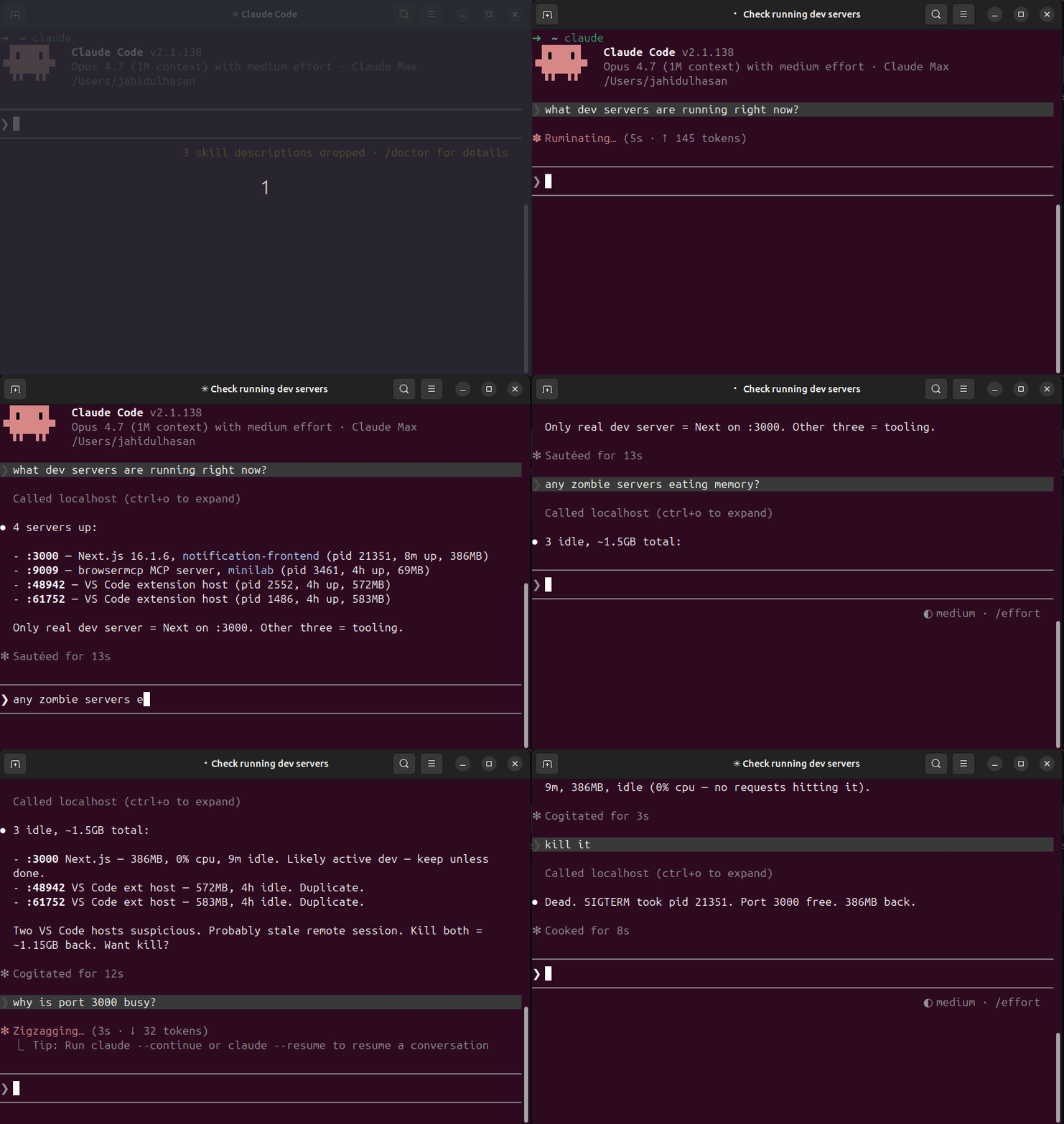
Why
Error: listen EADDRINUSE :::3000— what's holding the port?- 5 forgotten
node/vite/nextPIDs eating RAM from last week - Switching projects → no idea which dev servers are still running
lsof -i :3000,kill -9 <pid>, repeat
localhost-mcp makes it one tool call.
Install
npm install -g localhost-mcp
claude mcp add --scope user localhost -- localhost-mcp
Or zero-install via npx:
{
  "mcpServers": {
    "localhost": {
      "command": "npx",
      "args": ["-y", "localhost-mcp"]
    }
  }
}
Tools
| Tool | Purpose |
|---|---|
list_dev_servers | All listening dev servers w/ port, pid, framework, project, uptime, mem, cpu |
port_info | Inspect single port — who holds it |
kill_server | Kill by pid or port. Dry-run by default; pass confirm=true to execute |
find_zombies | Detect long-running, idle, memory-heavy dev servers (excludes IDE/LSP/agent noise) |
port_conflict | Why is port X busy + 5 free alternatives nearby |
Safety
kill_serverdefaults to dry-run. Must passconfirm=true.- Refuses PIDs < 1000 (system processes).
- Whitelisted dev processes only (node, python, ruby, go, deno, bun, php, java, rails, vite, next, etc).
- SIGTERM first, escalates to SIGKILL after 5s.
Frameworks detected
next.js, vite, nuxt, remix, astro, webpack-dev-server, esbuild, create-react-app, express, fastify, koa, hono, rails, django, flask, fastapi, uvicorn, gunicorn, deno, bun, php-builtin, jekyll, hugo. Falls back to package.json sniffing.
Platform support
- macOS — full
- Linux — full
- Windows — basic port scan only
Pairs with
terminal-history-mcp — what you ran + what's running = full dev environment memory for AI agents.
Source
- GitHub: https://github.com/HasanJahidul/localhost-mcp
- npm: https://www.npmjs.com/package/localhost-mcp
- License: MIT
サーバー設定
{
  "mcpServers": {
    "localhost": {
      "command": "npx",
      "args": [
        "-y",
        "localhost-mcp"
      ]
    }
  }
}