MCP.so
登录

YouTube MCP Server已验证已精选

@HasData

基本信息

分类

数据与分析

许可证

MIT

认证方式

oauth

作者

HasData

提交者

Sergey Ermakovich

关于 YouTube MCP Server

Hosted YouTube MCP server for search, video metadata, channel data and timestamped transcripts. Connect Claude, Cursor or other MCP clients with HasData; no YouTube API key required.

YouTube MCP Server 配置

使用下面的配置,将此服务器添加到你的 MCP 客户端。

{
  "mcpServers": {
    "youtube": {
      "url": "https://mcp.hasdata.com/mcp?apis=youtube",
      "headers": {
        "x-api-key": "YOUR_HASDATA_API_KEY"
      }
    }
  }
}

YouTube MCP Server 工具

4

Get YouTube Channel Data Fetches a YouTube channel by its ID (`UC…`) or handle (`@name`) and returns structured data for any channel tab — `featured`/Home, `videos`, `shorts`, `streams`, `playlists`, `posts`, `podcasts`, `releases`, `store` (desktop only), `about`. Returns channel identity (title, description, avatar, banner), subscriber count, country, join date, total-view count and social links (on the `about` tab), and the items on the requested tab (videos with views and publish date, playlists, posts, podcasts, etc.). Use to monitor competitor channels, build creator/brand directories, track posting cadence and growth signals, or feed `videoId` into the YouTube Video / Transcript endpoints.

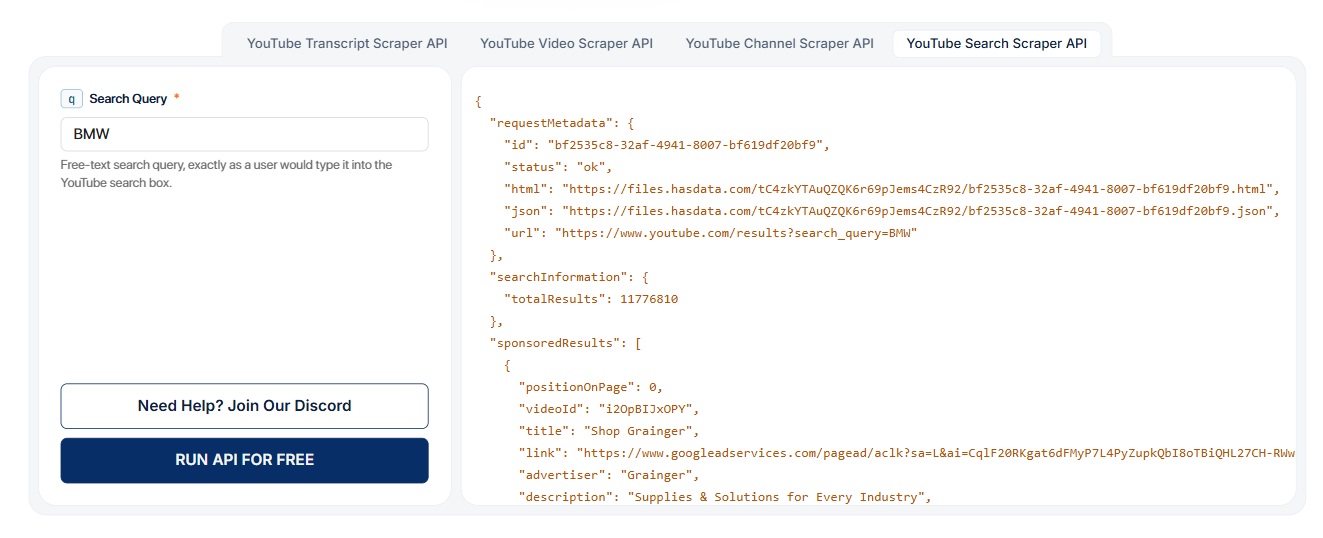
Get YouTube Search Results Searches YouTube for a query and returns the full results page split into `videoResults` (videoId, title, views, length, publish date, chapters, channel info, extensions like 4K/CC), `channelResults` (channelId, handle, subscribers, verified flag), `shortsResults` / `inlineShortsResults`, themed `shelves` (e.g. 'People also watched', 'Latest from <creator>'), `adsResults` and `sponsoredResults` (advertiser, landing URL, position), plus `searchInformation.totalResults`. Each block preserves its `positionOnPage` so the original layout is reconstructable. Use for competitor and topic monitoring, brand-mention tracking, ad-placement intelligence, creator discovery, trend research, or to feed `videoId` / `channelId` into the YouTube Video, Channel, or Transcript endpoints.

Get YouTube Video Transcript Returns the timed transcript (subtitles) of a YouTube video by its 11-character `videoId`. `languageCode` selects the track (e.g. `en`, `de-DE`, `pt-BR`); `type=asr` requests the auto-generated speech-recognition track. Each segment in `transcript[]` carries `startMs`, `endMs`, `snippet`, and a formatted `startTimeText`. The response also includes `availableTranscripts[]` listing every track on the video (language name + code, `type: asr` for auto-generated, `selected: true` for the one returned) so callers can discover what else is available. Use to feed a video's spoken content into RAG/LLM pipelines, generate summaries or chapter outlines, build searchable archives, run translation or accessibility workflows, or analyze talking points across a creator's catalog (pair with the YouTube Channel endpoint to enumerate videos, then fetch transcripts).

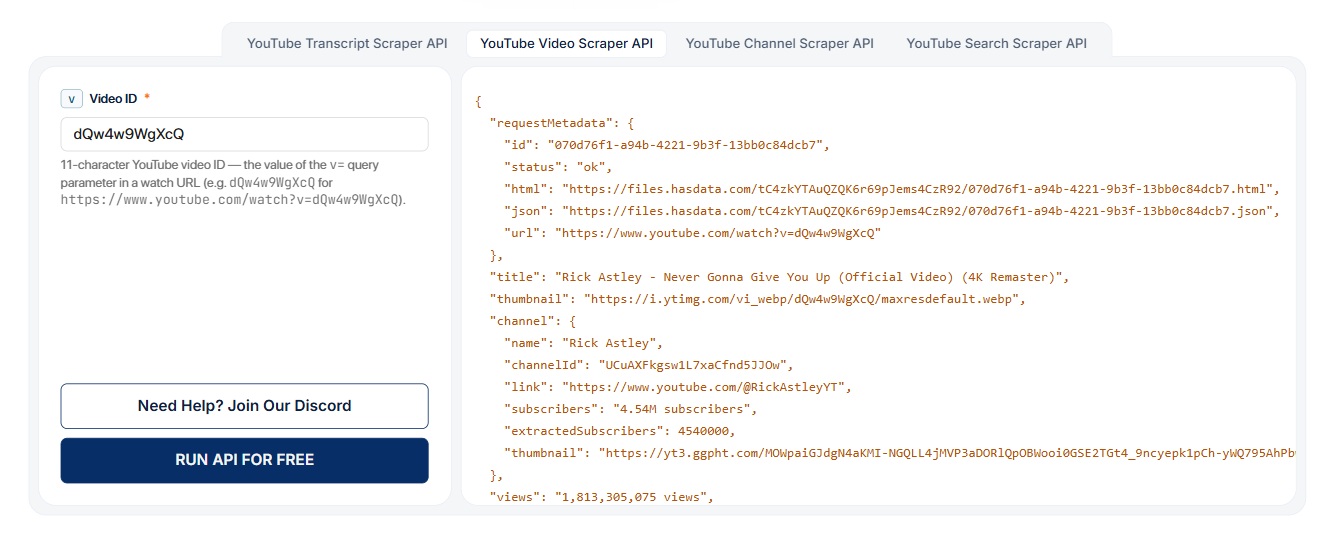
Get YouTube Video Data Fetches a single YouTube video by its 11-character `videoId`. Returns title, thumbnail, raw + normalized views and likes, `lengthSeconds`, publish date, category, keywords/tags, `isFamilySafe` / `isUnlisted` flags, the uploading channel (id, link, subscribers, avatar), the full description with parsed links and hashtags, available `captions` tracks (with `kind: asr` for auto-generated), Content-ID `music` matches (song/artist/album), creator `socialLinks`, and the `relatedVideos`, `endScreenVideos`, and `relatedShorts` rails. Use to enrich a video URL with metadata, monitor view/like growth, extract music or sponsor/affiliate links, gather features for recommender or RAG pipelines, or detect caption tracks before calling the YouTube Transcript endpoint.

概览

YouTube search, video data and transcripts for AI agents

YouTube MCP Server connects Claude, Cursor, Windsurf, and other MCP clients to public YouTube search results, video metadata, channel data, and timestamped transcripts. Hosted by HasData, it provides four read-only tools over Streamable HTTP. A HasData account replaces the need to configure a Google Cloud project or obtain a YouTube Data API key. Server details.

Use it for video research, competitor content analysis, and preparing summaries grounded in a video's transcript. The server retrieves structured data; your AI client writes the summaries, compares topics, and draws conclusions.

What can I ask it to do?

  • "Find recent YouTube tutorials about web scraping, sorted by upload date and under four minutes long. Return titles, video IDs, and view counts."
  • "Read the videos tab for @GoogleDevelopers. Group the returned upload titles by topic and link each example to its video."
  • "Get the transcript for this video ID. Summarize the main argument with timestamps, and identify the language track used."

These prompts are example workflows. The agent may make several calls, particularly when retrieving additional pages or transcripts for multiple videos.

Four YouTube tools

ToolInput and result
hasdata_youtube_search_getYoutubeSearchResultsRequires q. Search by keyword with optional sortBy, date, length, and videoType; use paginationToken for another page. Returns search results grouped by content type. Search parameters.
hasdata_youtube_video_getYoutubeVideoRequires v, the 11-character video ID. Retrieves video metadata, including title, description, engagement counts, and related videos where available. Video parameters.
hasdata_youtube_channel_getYoutubeChannelRequires channelId, accepting a channel ID or @handle. Select a tab, such as videos, shorts, or about; paginate when needed. Channel parameters.
hasdata_youtube_transcript_getYoutubeTranscriptRequires v. Retrieves transcript segments and available language tracks. Use languageCode for an existing track and type: "asr" for an available auto-generated track. Transcript parameters.

Transcript segments include text and start/end timestamps. Optional result fields depend on the video or channel, so ask your agent to flag missing data when making comparisons.

Connect your MCP client

Use https://mcp.hasdata.com/api/mcp?apis=youtube. The apis=youtube filter exposes the four YouTube tools.

For Cursor, add this to .cursor/mcp.json and replace the placeholder with your HasData API key:

{
  "mcpServers": {
    "youtube": {
      "url": "https://mcp.hasdata.com/api/mcp?apis=youtube",
      "headers": {
        "x-api-key": "YOUR_HASDATA_API_KEY"
      }
    }
  }
}

Clients with OAuth support can add the endpoint and sign in with HasData. Client-specific settings and authentication guidance are in the MCP documentation.

Cost and free tier

Each successful YouTube tool call costs 10 credits. HasData's free plan renews 1,000 credits monthly with no credit card required: up to 100 YouTube calls if you use those credits only for YouTube. Search pagination and additional transcripts consume separate calls. Check the current pricing for paid plans and their billing terms.

常见问题

1

Can I retrieve every video's transcript?

Only videos with an available transcript are supported. Check `availableTranscripts` and the selected track; requesting an unavailable language can fall back to the default. [Transcript behavior](https://github.com/HasData/youtube-mcp#tools).

2

Can it upload videos or access private analytics?

No. These four tools read public data. They do not upload videos, manage channels, retrieve comments, or provide private YouTube Studio analytics. [Supported scope](https://github.com/HasData/youtube-mcp#how-it-compares).

3

Is this maintained by YouTube?

It is maintained by HasData, an independent provider. See the [YouTube API product page](https://hasdata.com/apis/youtube-scraper-api) for request examples and response schemas.

评论

数据与分析 分类下的更多 MCP 服务器