

Chromium Bridge MCP Server
@dashi96
基本信息

关于 Chromium Bridge MCP Server
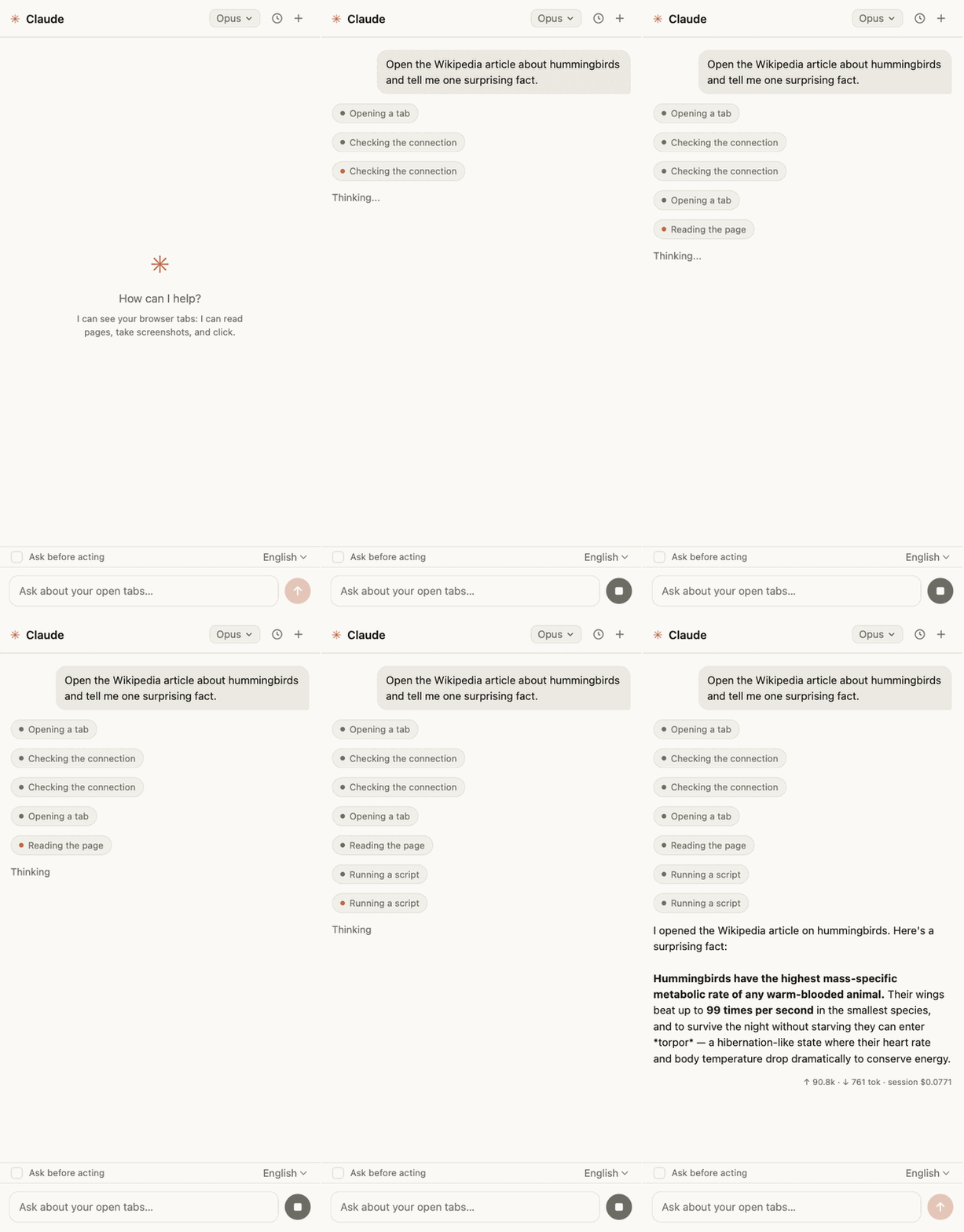
MCP bridge between Chromium browsers and Claude Code — browser automation tools + Claude chat panel for browsers where the official Claude in Chrome extension doesn't work (Arc, Vivaldi, …)
Chromium Bridge MCP Server 配置
使用下面的配置,将此服务器添加到你的 MCP 客户端。
{
  "mcpServers": {
    "chromium-bridge": {
      "command": "npx",
      "args": [
        "chromium-bridge"
      ]
    }
  }
}
Chromium Bridge MCP Server 工具
18Check whether the browser extension is connected to the bridge. Returns {connected: boolean}. Read-only, no side effects. Call it first in a session, or when other browser_* tools fail, to distinguish "extension not connected" from page-level errors.
List all open browser tabs with their id, title, and URL. Read-only. Use it to pick a tabId for the other browser_* tools; prefer reusing an existing tab over creating a new one when the target page is already open.
Open a new browser tab and return its id and windowId. Mutating: adds a tab to the user's real browser and focuses it. Use when a fresh page is needed; to work with a page that is already open, find its id via browser_tabs_list instead.
Close a browser tab by id. Destructive: the tab and its unsaved page state are gone, with no undo. Close only tabs this session created, unless the user explicitly asked to close theirs.
Navigate an existing tab to a URL, or move through its history with url="back" / url="forward". Mutating: replaces the page currently shown in that tab. Returns when navigation is committed; dynamic pages may still be rendering — verify with browser_page_text or a screenshot before interacting.
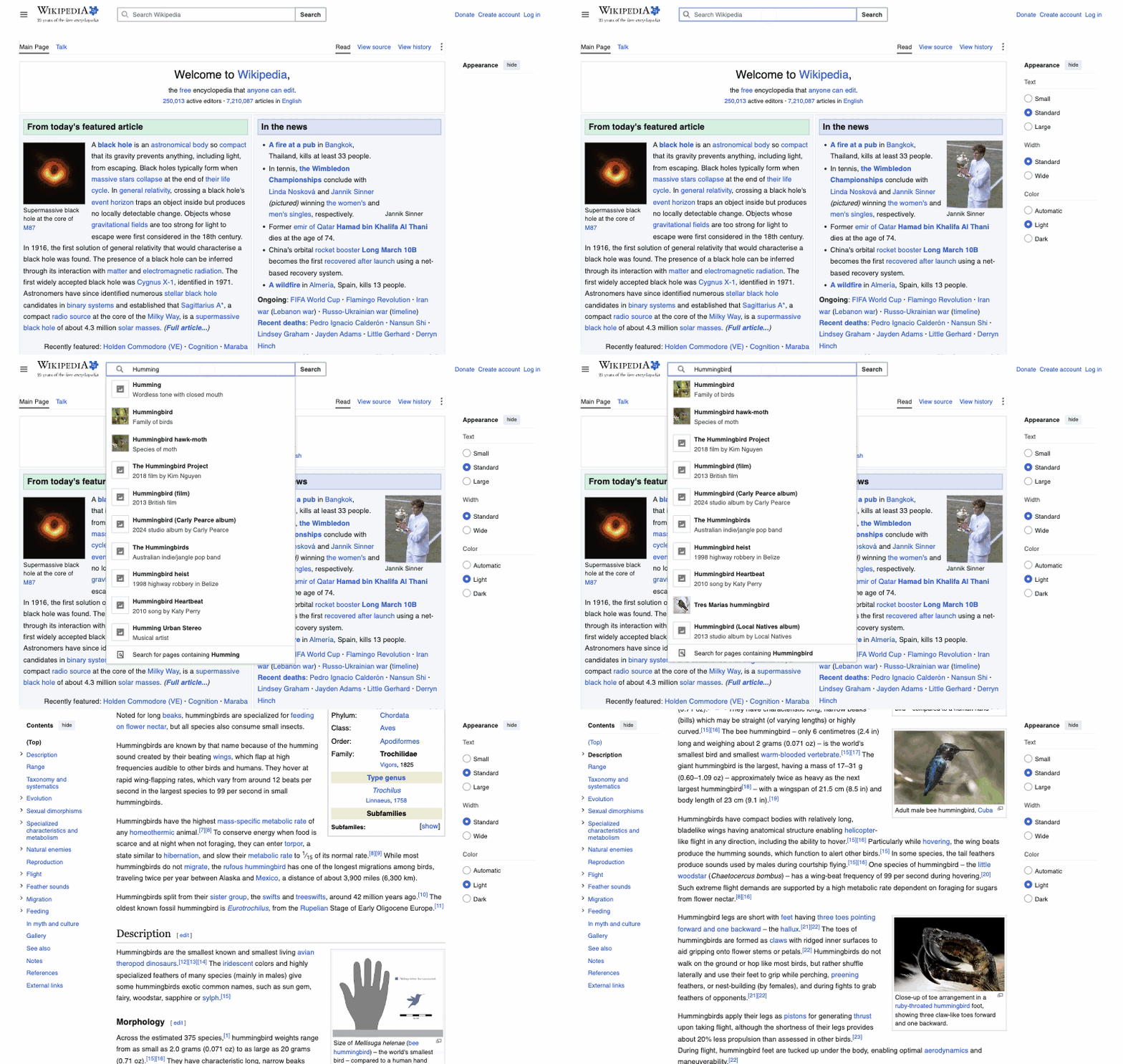
Get a tab's title, URL, and visible text (up to 80 kB) from the live DOM. Read-only and cheap — prefer it over a screenshot whenever layout does not matter. Content rendered to canvas or images is invisible to it; use a browser_computer screenshot for those.
Mouse, keyboard, and screenshots in a browser tab via the DevTools protocol; the tab does not need to be active (first use shows Chrome's "started debugging" info bar — that is expected). Actions: screenshot (viewport image in CSS pixels — its coordinates map 1:1 to click coordinates), zoom (magnified region [x0,y0,x1,y1]), left_click, right_click, double_click, triple_click, hover, left_click_drag (start_coordinate→coordinate), type (insert text at the current focus), key (space-separated combos, e.g. "cmd+a Backspace"), scroll (scroll_direction+scroll_amount), scroll_to (ref), wait (duration, max 10 s). Clicks, typing, and key presses are real input events and mutate page state; screenshot/zoom/hover/wait are read-only. Positions come from coordinate:[x,y] or from a ref returned by browser_read_page/browser_find — refs are more reliable than eyeballed coordinates.
Accessibility tree of the page with a ref id per element; use refs with browser_computer (clicks, scroll_to) and browser_form_input. filter=interactive returns only clickable/editable elements — a compact map of the page. Read-only. Refs go stale after navigation or heavy DOM changes; call again to refresh.
Find elements by visible text, accessible name, or role, and return their refs for use with browser_computer and browser_form_input. Read-only. Cheaper than reading the whole accessibility tree when you know what you are looking for. An empty result means nothing matched — not an error.
Set a form control's value directly in the DOM: input/textarea/contenteditable (text), select (option value or label), checkbox/radio ("true"/"false"). Fires input/change events so frameworks pick the value up. Mutating. Target by CSS selector or ref. Reliable for plain form fields; rich editors (CodeMirror and the like) and custom comboboxes often ignore it — for those, click the field with browser_computer and type.
Click an element via DOM .click() by CSS selector. Mutating. Works without the debugger — including on pages where CDP attach fails — but only fires the click handler, with no hover/focus/mousedown chain. If the page ignores it (custom dropdowns, canvas UI), use browser_computer left_click for a real mouse event.
Put local files into an <input type="file"> selected by CSS selector, as if the user picked them in the file dialog (fires change). Mutating. files are absolute paths on the user's machine; the input must already exist in the DOM.
Run arbitrary JavaScript in the page context and return the resolved value (await is supported; runs with the page's own permissions). Can read and mutate anything on the page — treat as mutating unless the code is clearly read-only. Never call alert/confirm/prompt: modal dialogs freeze all automation. Requires the CDP debugger.
Read a tab's console output (log/warn/error), newest 200 entries. Read-only unless clear=true, which empties the buffer after reading. Messages are captured only from the first time a CDP tool touches the tab — nothing is recorded retroactively; reload the page after attaching to capture its startup logs. Use pattern (regex) to cut noise.
List a tab's network requests (method, URL, status), newest 200. Read-only unless clear=true, which empties the buffer. Captured only from the first CDP touch of the tab — reload the page after attaching to see its full traffic. urlPattern (regex) filters by URL.
Resize the browser window that contains the tab to width×height CSS pixels. Mutating and user-visible: it resizes the user's real window. Use for reproducing responsive layouts or framing a recording, and consider restoring the original size afterwards.
Start recording the tab into an animated GIF: a frame every intervalMs (default 800 ms); on long recordings the frame rate halves automatically so the whole scenario fits in ~80 frames. One recording per tab at a time; starting twice is an error. Nothing is saved until browser_gif_stop.
Stop the recording started by browser_gif_start and write the animated GIF to an absolute path on the user's machine. Mutating: creates or overwrites that file. Errors if no recording is active or no frames were captured.
概览
What is Chromium Bridge?
An MCP bridge between Chromium browsers and Claude Code. It gives Claude Code a set of browser_* automation tools plus a Claude chat panel inside the browser — aimed at Chromium browsers where the official "Claude in Chrome" extension isn't available (Arc, Vivaldi, Brave, …).
Two parts:
- extension/ — an MV3 extension whose service worker keeps a WebSocket to the server and drives the tab through the Chrome DevTools Protocol (CDP).
- server/ — a stdio MCP server that exposes the
browser_*tools to Claude Code.
How to use Chromium Bridge?
Add it to your MCP client config:
{
  "mcpServers": {
    "chromium-bridge": {
      "command": "npx",
      "args": ["chromium-bridge"]
    }
  }
}
Then install the extension in the browser profile you want to automate. The tools only work while the server is running (typically an active Claude Code session).
Tools
| Tool | What it does |
|---|---|
browser_status | Check the connection to the extension |
browser_tabs_list | List tabs (id, title, URL) |
browser_tab_create / browser_tab_close | Open / close a tab |
browser_navigate | Navigate to a URL; back/forward for history |
browser_page_text | Page title, URL, and visible text |
browser_computer | Mouse/keyboard/screenshots via CDP: click, drag, hover, type, key combos, scroll, zoomed screenshots |
browser_read_page | Accessibility tree with ref ids (filter=interactive) |
browser_find | Find elements by text/role, returns refs |
browser_form_input | Set input/textarea/select/checkbox/contenteditable values |
browser_click | DOM click by CSS selector |
browser_upload_file | Put files into an <input type="file"> |
browser_javascript | Run JS on the page (await supported) |
browser_console_messages | Tab console (with a regex filter) |
browser_network_requests | Tab network requests (with a regex filter) |
browser_resize_window | Window size |
browser_gif_start / browser_gif_stop | Record a GIF of the tab to a file |
Everything except basic tab operations runs through chrome.debugger (CDP): screenshots don't require activating the tab, and clicks are real mouse events.
Limitations
- The extension lives in one browser profile — install it in the one you want to automate.
- It only works while the MCP server is running.
Where is the source code?
The source is on GitHub, linked from the repository URL on this page.
浏览器自动化 分类下的更多 MCP 服务器

Fetch MCP
jae-jaeMCP server for fetch web page content using Playwright headless browser.

HTML/CSS to Image
An MCP server for generating images from HTML & CSS or screenshots of URLs using htmlcsstoimage.com.

Puppeteer
modelcontextprotocolModel Context Protocol Servers

BrowserTools MCP
AgentDeskAIMonitor browser logs directly from Cursor and other MCP compatible IDEs.

Apify Model Context Protocol (MCP) Server
apifyThe Apify MCP server enables your AI agents to extract data from social media, search engines, maps, e-commerce sites, or any other website using thousands of ready-made scrapers, crawlers, and automation tools available on the Apify Store.
评论